
Canvas size
Add space around the art, crop it, or scale the pixels.
Open Sprite > Canvas Size…. This is a separate options window tied to the asset you opened it from. Nothing changes until you press Apply to All Frames.
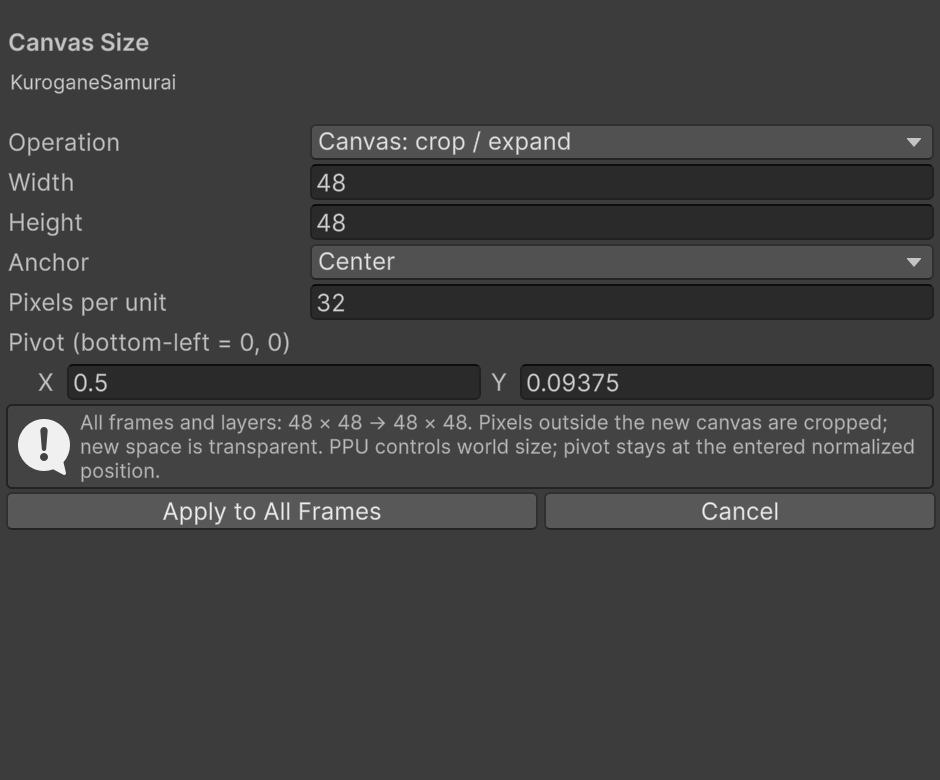
Crop or expand
Choose Canvas: crop / expand to keep the pixels at their current size. Enter the new width and height, then choose one of the nine anchors to position the old canvas within the new one.
For example, to give a 16×16 sprite more room on every side, set it to 24×24 with the Center anchor. Existing pixels remain the same size and the added margin is transparent.
Making the canvas smaller crops pixels outside its new bounds. Undo restores them. This operation affects every frame and layer, including hidden or locked layers.
Scale artwork
Choose Scale artwork: nearest neighbor to resize the pixels too. Scaling 16×16 to 32×32 repeats each pixel into a 2×2 block. The anchor isn't used for this operation.
Downscaling can lose small details; fractional scales can make some features wider than others. Pixart doesn't blur the image or add interpolated palette colors. Check the result and Undo if needed.
Pixels per unit and pivot
Pixels per unit (PPU) controls the sprite's size in Unity. A 32×32 canvas at 16 PPU covers 2×2 world units. If you double the artwork dimensions but want to keep its world size, double PPU as well.
The pivot uses normalized bottom-left coordinates: (0,0) is bottom-left, (0.5,0.5) is the center and (1,1) is top-right. This is different from the canvas's top-left pixel coordinate readout.
Apply performs one undoable change across the whole asset and fits the editor view to the result. Save to update the imported sprites. The maximum dimension is 4096 per axis, but document, preview and undo memory budgets can reject a large resize before that limit.